
In this guide, I walk you through every step you need. You’ll learn how log in to the EPFO portal, check your balance, download your passbook online, and track claims. Each process is explained clearly so you can manage your PF account independently without confusion.
What Is EPFO Login and Why It Matters
EPFO login is the secure access point on the member portal where employees enter their Universal Account Number (UAN) and password to manage their provident fund accounts. The EPFO, which operates under the Ministry of Labour and Employment, Government of India, administers the Employees’ Provident Fund Scheme to help employees save for retirement and other financial goals.
This portal matters because your provident fund savings grow over time with contributions from both you and your employer. Logging in to this lets you see exactly where your money stands. You can track monthly deposits, check interest credited to your account, and confirm that employer contributions are being made correctly. Over time, this visibility helps you plan for retirement, verify records, and avoid surprises when you need to withdraw funds.
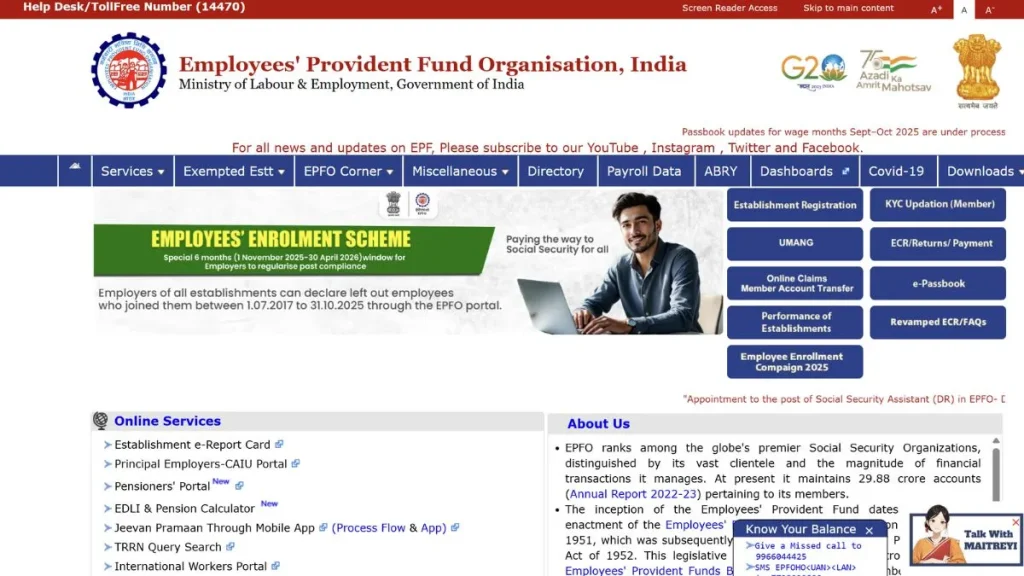
EPFO Passbook – Check PF Balance, Contribution and Download PDF
Your EPFO Passbook is a digital document that shows a complete record of your provident fund contributions. It lists monthly contributions made by both you and your employer, and it shows the interest credited by EPFO over time. Having this information in one place helps you track your savings accurately and ensure that no contributions are missing.
You can access your passbook online once you have completed the EPFO Login and activated your UAN. It acts as proof of your PF status and is useful for financial planning, checking gaps in contributions, and preparing for withdrawals or transfers.
How to Check EPF Passbook Online
You can view your EPF passbook online through the EPF passbook portal. This service is available once your UAN is active and linked with your PF account.
Steps to check EPF passbook:
- Visit the official EPF passbook portal: https://passbook.epfindia.gov.in/MemberPassBook/Login
- Enter your UAN and password
- Complete the captcha verification
- Select your Member ID to view your passbook details
- Review your PF balance and all contributions
This view shows monthly deposits, interest credited, and totals at a glance.
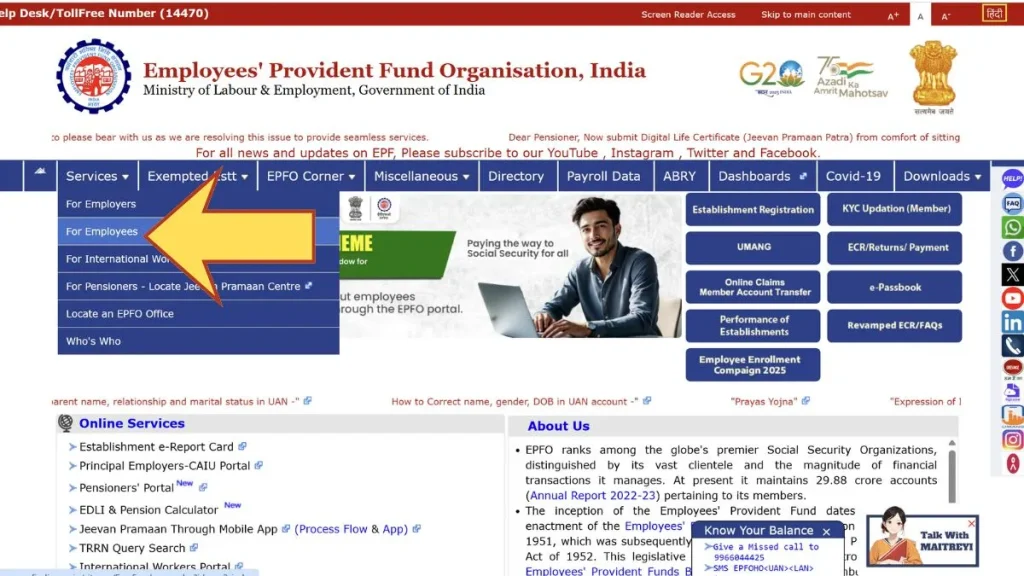
What Details Are Shown in EPF Passbook
- Employee contribution: The portion of your salary going into PF
- Employer contribution: The portion your employer adds each month
- Interest credited: Annual interest added to your total balance
- Monthly deposits: A detailed timeline of contributions
These details help you verify that contributions are being credited correctly and that your PF balance is growing as it should.
Employee and Employer Contribution
Both you and your employer contribute to your PF account every month. Generally, the employee’s contribution is 12% of basic salary plus dearness allowance (DA). The employer also contributes an equivalent 12%, although a portion of that goes into the Employees’ Pension Scheme (EPS) and other funds. These splits are visible in your passbook.
Understanding these contributions matters because it affects your total savings and future pension too. If you switch jobs frequently, checking these details regularly helps you catch missing or incorrect deposits early.
How to Download EPFO Passbook PDF
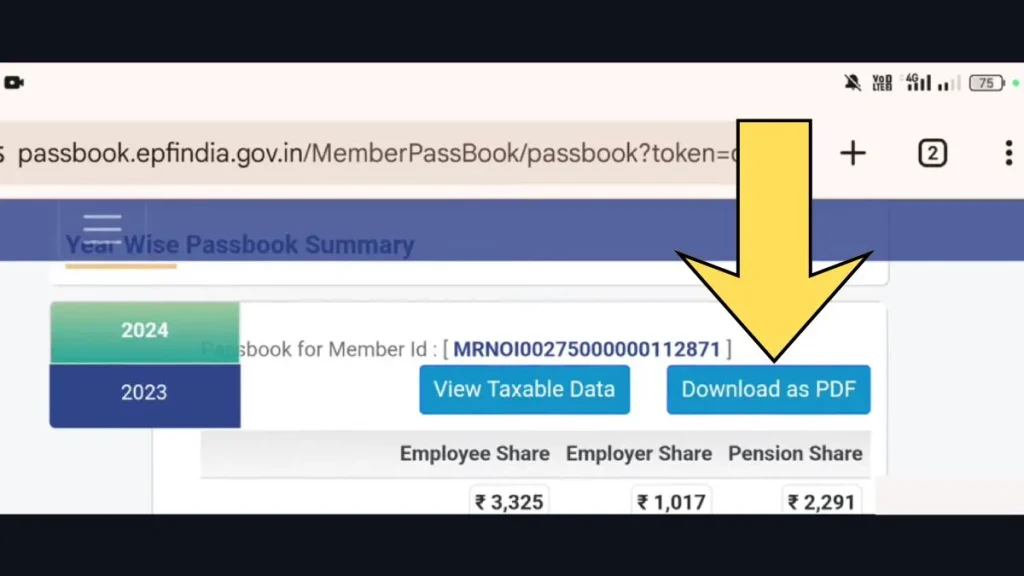
Downloading a PDF of your EPF passbook gives you a snapshot of your account that you can save or print.
Steps to download EPFO passbook
- Go to the passbook login portal
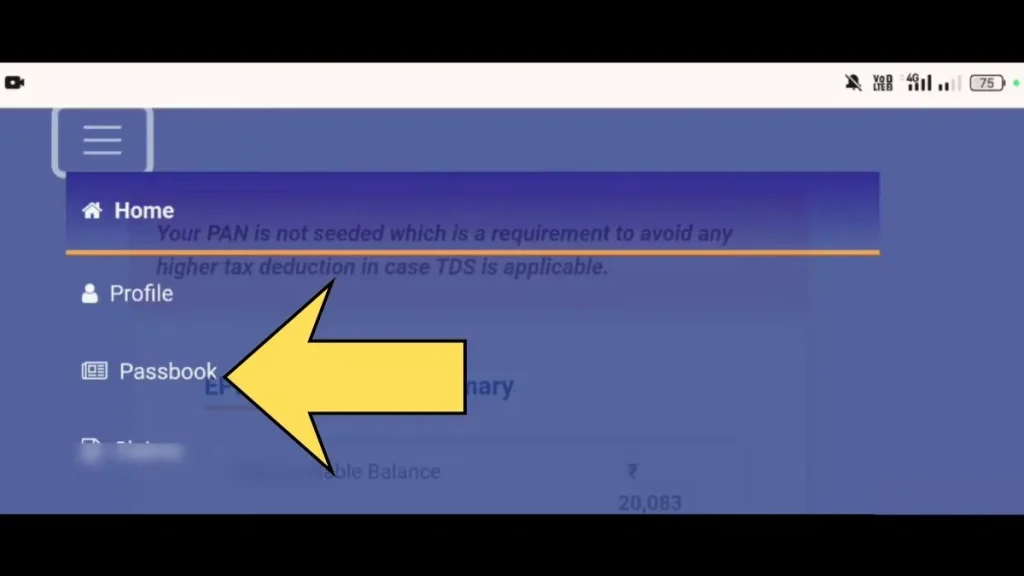
- Log in with your UAN and password
- Select your Member ID
- Click the “Download” option
- Save the PDF for future reference
Why EPF Passbook Is Important
The EPF passbook acts as proof of your PF savings. It helps you verify employer deposits and interest updates.
- Confirms monthly deposits by you and your employer
- Helps during PF withdrawal or transfer
- Useful for retirement and financial planning
- Acts as proof for loan or compliance purposes
Keeping track of these details helps you avoid surprises later when you need your funds.
EPFO Login – How to Sign In to Your PF Account
EPFO login allows you to access all PF-related services online. You need an active UAN linked with your mobile number. Once logged in, you can manage your PF account independently.
Steps for EPFO login
- Visit the official EPFO Unified Member Portal: https://unifiedportal-mem.epfindia.gov.in
- Click on “Member Login”
- Enter your UAN, password, and captcha
- Submit and access your dashboard
Once you log in to the EPFO portal, you can now check balances, download passbooks, file claims, and update your KYC.
Important Document Required for EPFO Login
Before you log in, make sure you have:
- Active UAN
- Registered mobile number linked to your UAN
- Aadhaar linked with your UAN
- Updated bank details and PAN
Having these documents verified helps you avoid login failures and access all features smoothly.
Services Available After EPFO Login
After logging in to the EPFO portal, several services become available to manage your PF account online. These options help you track money, submit requests, and keep your details updated without office visits.
| Service | Purpose |
|---|---|
| EPF Passbook | Shows your PF balance along with monthly employee and employer contributions |
| Claim Status | Lets you track the progress of your PF withdrawal request |
| Online Claim | Allows PF withdrawal and advance claims directly through the portal |
| KYC Details | Helps update and verify Aadhaar, PAN, and bank account information |
| Profile Details | Displays your personal and employment-related details |
Why Use the EPFO Unified Portal
The Unified Portal brings all EPF-related services under one secure online system. You no longer need to visit an office to check balances or submit claims. It saves your time and gives more transparency over your PF account.
Once your UAN is activated and linked with Aadhaar and bank details, you can complete tasks like claim tracking and profile updates independently.
Benefits of Using EPFO Portal
- Easy access to PF account details
- Real-time tracking of contributions
- Online PF withdrawal and transfer
- Digital KYC updates
- 24×7 availability
These benefits make managing your retirement savings simpler and more efficient.
Key Features of EPFO Portal
- Check PF balance
- Download EPF passbook
- Submit and track claims
- Update KYC status
- View service history
These features give you complete control over your PF account without paperwork.
Common EPFO Login and Portal Problems
Using the EPFO portal is mostly smooth, but some common issues can slow you down. Often, these problems relate to login credentials or system sync issues.
EPFO Login Not Working
This usually happens when UAN or password is incorrect, or the UAN has not been activated. Double-check credentials and consider using password reset if needed.
OTP Not Received on Mobile
If your registered mobile number is not active or linked properly, OTPs may not come through. Ensure your number is correct and try again.
Mobile Number Change Issues
When you change your mobile number, it must be updated in the system. This often involves verification and may take time to reflect.
Claim Rejected or Under Process Too Long
Your claim may be “Under Process” for verification, or rejected if documents are incorrect or incomplete. Checking KYC and document accuracy helps reduce these issues.
EPFO Member Login vs Employer Login – Key Difference
EPFO provides separate login systems for employees and employers. Each portal serves a different purpose. Understanding the difference helps avoid login confusion.
EPFO Member Login (Employee Login)
- Used by salaried employees
- Access PF balance and passbook
- Submit PF claims online
- Update KYC details
EPFO Employer Login
- Used by employers and HR teams
- Upload PF contributions
- Approve employee details
- Manage compliance and ECR files
Understanding this difference ensures you use the right epfo portal for your needs.
How to Withdraw PF Online
Once your KYC is complete, you can apply for PF withdrawal online. The system lets you choose the type of claim, like final settlement or partial withdrawal.
Steps to withdraw PF Online:
- Log in to the EPFO member portal
- Go to “Online Services”
- Select the claim form you want to submit
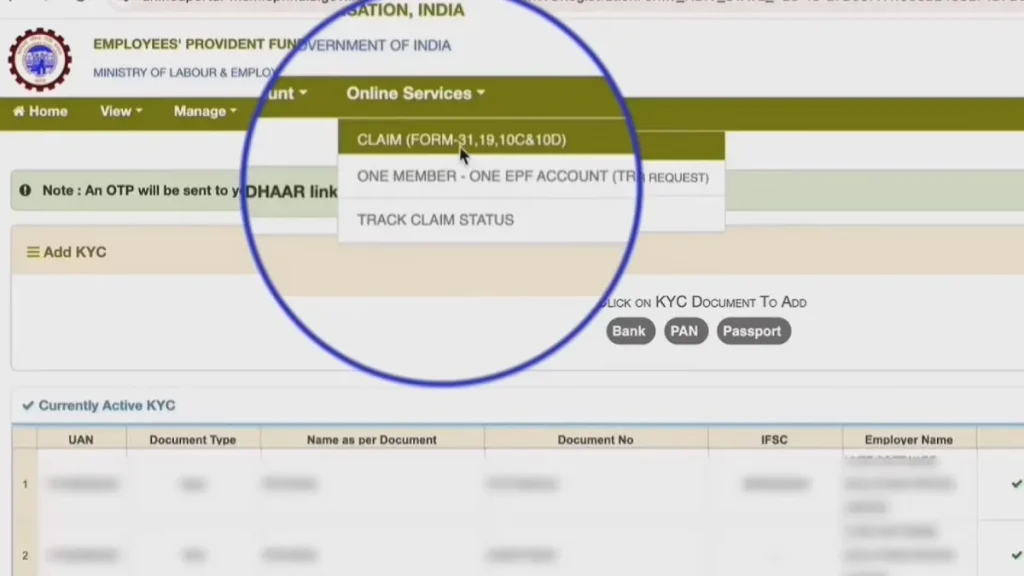
- Enter required bank and personal details
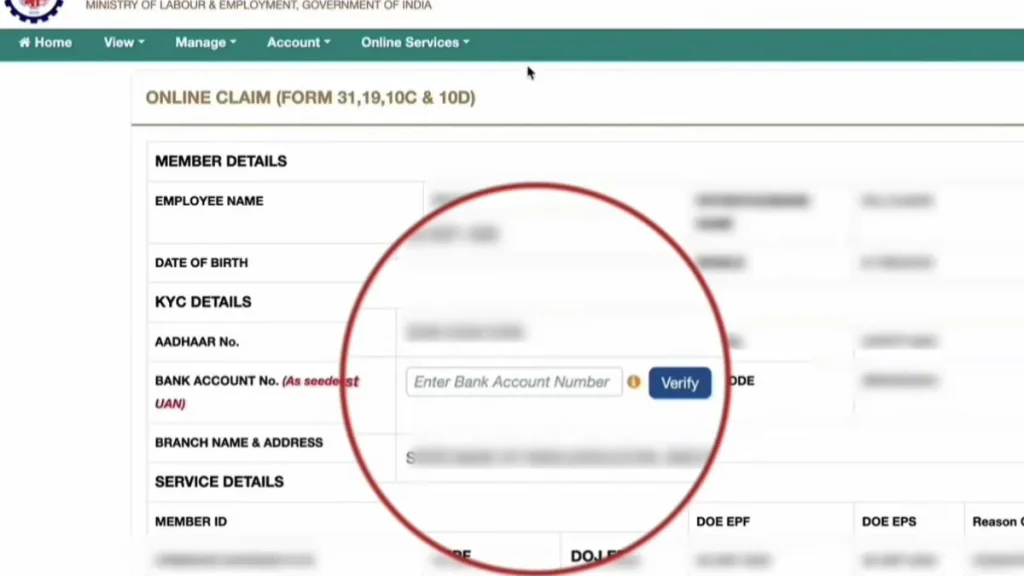
- Submit and track the claim
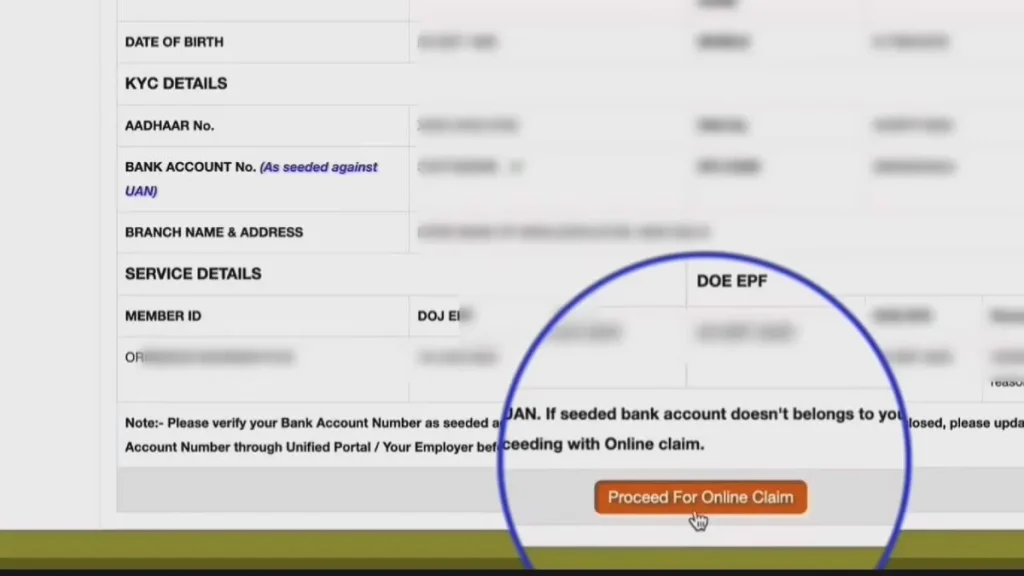
This reduces paperwork and speeds up the process.
| Purpose | Eligibility | Max Withdrawal Limit |
|---|---|---|
| Home Purchase | 5+ years | 36× basic + DA |
| Loan Repayment | 10+ years | 36× basic + DA |
| Marriage | 7+ years | 50% of employee share |
| Education | 7+ years | 50% of employee share |
| Medical Treatment | No limit | 6× basic + DA |
| Pre-Retirement | Age 57+ | 90% of balance |
Check KYC Status
Always verify your KYC before submitting a claim.
- Log in to EPFO portal
- Open Manage section
- Select KYC
- Verify Aadhaar, PAN, and bank status
How to Get PF Claim Settled Faster
Some tips that help settle claims faster include keeping your KYC up to date and ensuring all details match across documents. Here’s what to focus on:
- Complete Aadhaar and bank KYC
- Match your name and details across records
- Avoid duplicate or incorrect claims
These steps reduce verification delays and help your claim move ahead smoothly.
Check PF Claim Status
To check your claim progress:
- Log in to EPFO portal
- Go to “Online Services”
- Click “Track Claim Status”
Your current claim status appears with dates and remarks.
| Form | Used For |
|---|---|
| Form 31 | Partial PF withdrawal (while working) |
| Form 19 | Final PF settlement |
| Form 10C | Pension withdrawal |
FAQ’s | EPFO Portal Login
EPFO Unified Portal Customer Service
Toll-Free Helpline: 1800 118 005
- Email: employeefeedback@epfindia.gov.in
- Official Website: https://www.epfindia.gov.in
- Portal Login: https://epfigms.gov.in
- Facebook: https://www.facebook.com/socialepfo
- Instagram: https://www.instagram.com/social_epfo/